Monitoring
Waterline is the operator UI and API for workflow state. Its delivery follows the selected runtime boundary: Cloud includes Managed Waterline, while a self-hosted operator deploys Waterline separately when that surface is wanted.
Waterline is one operator product with three consumption surfaces:
- Embedded mode installs the Composer package in the Laravel application that owns the workflows and reads that application's durable state in process.
- Self-hosted service mode runs the published
durableworkflow/waterlineimage and reads state owned by the standalone server through the PHP SDK and public server API. The Server distribution does not bundle or operate Waterline. - Cloud Managed Waterline is the namespace-scoped operator experience included with Durable Workflow Cloud. Cloud operates Managed Waterline and the namespace runtime behind it.
The embedded and self-hosted service surfaces expose the same core Waterline UI
and /waterline/api/... operator route families. Cloud provides the operator
capabilities through its managed surface instead of a customer-deployed
Waterline route host. None of the surfaces merge runtime state: each view is
limited to runs owned by its runtime and namespace. For self-hosted Server
operations, the native API, CLI, and SDK operator surfaces remain available
whether or not you deploy Waterline. Use the
Server API Reference for those native
routes and the
Waterline Operator API Reference for
Waterline's routes and response contracts.
Durable Workflow has two observability planes:
| Plane | Source of truth | Typical questions |
|---|---|---|
| Durable state | The owning runtime's workflow database and API, Waterline projections, and history export | Did the workflow start? Which run is current? Which signal, update, timer, activity, retry, or failure was committed? Which operator action is safe now? |
| Worker/runtime telemetry | Queue worker logs, SDK metrics recorders, Prometheus/OpenMetrics endpoints, and application traces | Are workers polling? How long do tasks take? Is an exporter configured? Did custom application metrics leave the worker process? |
Waterline intentionally does not replace worker metrics. If a custom metric was recorded in activity or worker code, scrape the worker's telemetry endpoint. Use Waterline to correlate that runtime signal with the durable workflow history and current run state.
Worker and client setup also remains separate from the operator surface. Use the generated PHP SDK API reference, Python SDK API reference, or Rust SDK API reference alongside the language guides when connecting application clients and workers to the runtime that owns the namespace.
When worker telemetry shows repeated claims, late completion races, or stuck leases, read Execution Guarantees and Idempotency alongside this guide. That contract separates at-least-once transport uncertainty from duplicate durable outcomes so duplicate-looking evidence does not turn into the wrong operational conclusion.
Rust SDK 4.7.0 or later provides pluggable metrics recorders and an optional metrics-prometheus adapter. The default is no-op; applications own the scrape endpoint and exporter lifecycle. See Rust metrics setup and the released example for exact names, bounded tags and process-observation limits. This does not configure Server or Cloud metrics.
OpenTelemetry tracing
Connect application requests, workflow tasks and activity attempts across processes with optional OpenTelemetry tracing. Choose the setup for the runtime that owns your runs.
Embedded Laravel
To correlate application logs with a workflow run and activity attempt, configure the optional embedded tracing integration. It persists W3C context across queue workers, retries and recovery and uses your application's OpenTelemetry provider and Laravel log channels. Follow the guide to enable tracing, add the log tap, run the schema migrations and configure bounded exports. Review its span diagram and runtime/SDK capability matrix before rollout.
In the application’s config/workflows.php, map an application-owned environment flag to the existing tracing configuration:
'tracing' => [
    'enabled' => (bool) env('DW_TRACING_ENABLED', false),
    'baggage_allowlist' => [],
],
This example starts with no baggage. Install the optional API and configure your provider, log tap, migrations and bounded exporter as described in the linked guide, then restart workers.
Service-mode tracing
Configure the application's provider, sampling, propagators and bounded exporter before enabling SDK telemetry. Use the PHP tracing guide, Python telemetry guide or Rust telemetry API.
| Runtime | Propagation boundary |
|---|---|
| Embedded Laravel | The application's optional Core integration persists context across its queue workers. |
| PHP Server | The Server trace-context guide requires an application image with the optional API, enabled flag and actual nullable schema. |
| PHP, Python and Rust SDKs | Opt-in task/attempt spans and scoped log correlation. Durable caller propagation requires the exact advertised Server capability. Missing or malformed capability uses independent task traces. |
| Native Rust Server | This PHP tracing release does not qualify native carrier support or catalog conversion. |
| Cloud | This release includes no Cloud deployment. Confirm support with the managed runtime. |
Trace IDs, durable run/activity/attempt IDs and application request IDs remain distinct. Baggage is allowlisted and empty by default; links carry no baggage. Providers and exporters remain application-owned. Abrupt termination can lose telemetry, and replay does not promise exactly-once export. Use durable history for business outcomes.
Waterline views
Dashboard View
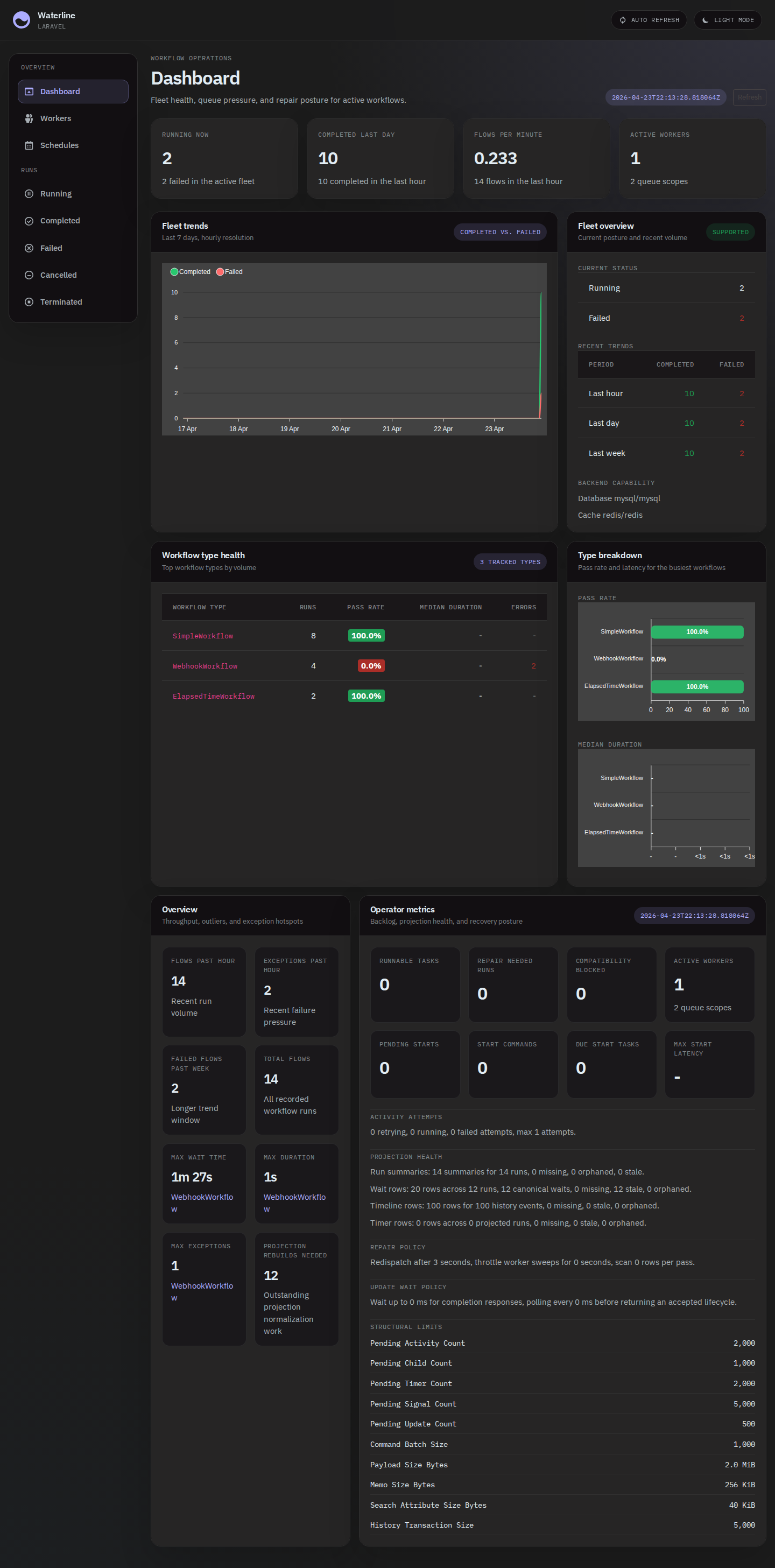
The dashboard shows running totals, recent-run counters, and fleet-wide metrics so you can tell at a glance whether work is flowing, stalling, or failing.
Use the Operator Operating Envelope when you need the rollout and runbook contract for those facts: which diagnostics block traffic, which are advisory, how queue-health facts split between Waterline and worker telemetry, and how to verify rebuild, export, and archive paths.
Workflow View
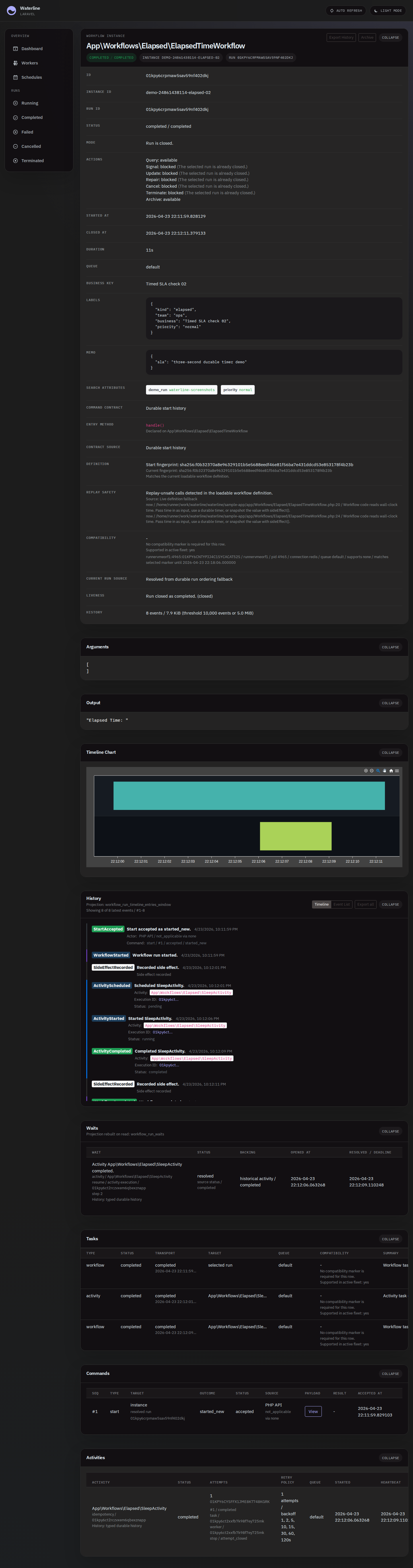
The workflow detail view shows the durable timeline for a single run: the activities, signals, timers, and child workflows that happened in order, each with its inputs, outputs, and timing.
Waterline deployment and access
Embedded Laravel
Install Waterline into your Laravel application alongside the workflow package and run its migrations. See durable-workflow/waterline for the full installation and configuration guide.
Embedded mode uses the host application's database connection, route middleware, authentication gate, and workflow package. Continue to operate the Laravel application, its queue workers, scheduler, migrations, and Waterline assets as one deployment boundary. The Waterline Operator API Reference includes the current Composer command and asset-publishing step.
Embedded operator permissions
These optional controls require Waterline 2.13.0. Keep the host's viewWaterline viewing gate: action gates grant no viewing access. By default, users who can view embedded Waterline can use its operator actions; the new settings are opt-in and preserve that behavior when unset. Check composer.lock: this feature minimum does not update the separately selected installation tuple, whose commands may still pin an older package without these controls.
To block operator writes for every viewer, set 'read_only' => true in config/waterline.php, or map WATERLINE_READ_ONLY=true through the host configuration before rebuilding its cache. Viewing, history exports, queries and personal saved views/preferences keep their existing authorization. This does not stop the host's workflow workers or change direct SDK/Server permissions.
For separate host-user permissions, define Laravel gates in a service provider and map every action group you want to restrict. The application ability names below belong to your host policy:
use Illuminate\Support\Facades\Gate;

Gate::define('waterline-messages', fn ($user) => $user->can('support-workflows'));
Gate::define('waterline-operations', fn ($user) => $user->can('operate-workflows'));
Merge this configuration into config/waterline.php:
'authorization' => [
    'gates' => [
        'messages' => 'waterline-messages',
        'repair' => 'waterline-operations',
        'cancel' => 'waterline-operations',
        'terminate' => 'waterline-operations',
        'archive' => 'waterline-operations',
        'schedules' => 'waterline-operations',
    ],
],
messages covers signals and updates; schedules covers pause, resume, trigger, backfill and delete. Each gate receives the current host user and optionally the HTTP request as its second argument. A null or omitted mapping preserves default action access. A configured gate must exist and authorize the user; invalid settings refuse the action. Normal Laravel guest and Gate::before rules apply, but global read-only takes precedence even over administrator overrides. No gate bypasses namespace or runtime action restrictions.
Deploy the host's resolved configuration and rebuild its configuration cache with php artisan config:cache; an environment change alone does not update cached or literal settings. Install the qualified package and publish its matching assets through the ordinary installation steps. Denied writes return HTTP 403 with reason=waterline_action_forbidden or reason=waterline_read_only and a capability. The UI hides unavailable run controls and explains disabled actions/schedule controls; backend enforcement also covers legacy and exact-run mutation URLs.
These are embedded host-user controls. Service mode keeps WATERLINE_ACCESS_MODE=read_only and its upstream token permissions rather than Laravel host gates. This feature changes no SDK/Core dependency floor and does not configure Cloud Managed Waterline.
Waterline service
The published image contains its own PHP and Laravel runtime. It does not need PHP, Composer, or the workflow package on the container host, and it never connects to the standalone server's database.
This example binds Waterline to loopback on host port 8080, persists its own
UI state in a named volume, and connects it to one server namespace:
export WATERLINE_SERVER_ENDPOINT=https://workflow.example.com
export WATERLINE_SERVER_TOKEN=replace-with-a-server-token

docker run --detach \
  --name waterline \
  --restart unless-stopped \
  --publish 127.0.0.1:8080:8080 \
  --volume waterline-data:/data \
  --env WATERLINE_SERVER_ENDPOINT \
  --env WATERLINE_SERVER_TOKEN \
  --env WATERLINE_NAMESPACE=orders \
  --env WATERLINE_ACCESS_MODE=read_only \
  --env WATERLINE_ALLOW_UNAUTHENTICATED=true \
  --env APP_URL=https://waterline.example.com \
  durableworkflow/waterline:2.12.1
Open /waterline through the URL represented by APP_URL. The image listens
on container port 8080; set PORT only when you intentionally change that
internal port. WATERLINE_PATH changes the default waterline URL prefix.
The repository also publishes a
Docker Compose service definition
with the same connection boundary.
Service mode has two independent authentication layers:
WATERLINE_SERVER_TOKENis the bearer credential Waterline uses when the PHP SDK callsWATERLINE_SERVER_ENDPOINT. Workflow, worker, queue, and schedule observation needs a server operator role; server health and operator metrics may need an admin role.- Browser and Waterline API access is the deployment's front-door boundary.
The self-contained image has no host Laravel user directory.
WATERLINE_ALLOW_UNAUTHENTICATED=truetherefore belongs only behind an authenticating reverse proxy or on a private interface such as the loopback binding above. Keep itfalseunless that surrounding authentication boundary is in place.
Set WATERLINE_NAMESPACE to the same namespace operators intend to inspect.
Waterline sends it on every SDK request. WATERLINE_ACCESS_MODE=read_only is
the default and blocks mutating actions in Waterline; use operator only with
a server token authorized for the required commands.
The /data volume holds Waterline-owned saved views, display preferences, and
Laravel runtime state. With the default settings it contains a file-backed
SQLite database at /data/waterline.sqlite. It never contains the server's
workflow history. Use DATABASE_URL or the ordinary DB_* settings when
Waterline's own state must live in MySQL or PostgreSQL.
Health and metrics
Use these probes for different questions:
| Surface | What it proves |
|---|---|
GET /up | The Waterline HTTP process started and can answer requests. The image's Docker health check uses this route. |
GET /waterline/api/v2/health | Waterline can assemble namespace-scoped server health, worker registration, and task-queue evidence through the PHP SDK. |
GET /waterline/api/stats | Dashboard totals and the server-backed operator summary used by Waterline. |
GET /api/system/health and GET /api/system/operator-metrics on the server | The native server health and operator contracts, independent of Waterline. |
Treat /waterline/api/stats as operator JSON, not as a Prometheus scrape
endpoint. Worker SDK metrics, logs, traces, and custom application telemetry
still come from worker processes. A healthy /up with an unavailable
Waterline health or stats response points to the server connection,
authorization, namespace, or SDK capability boundary rather than a failed
Waterline process.
Workflow visibility and operator actions
In service mode, list views, selected-run detail, history export, schedules, worker status, task-queue evidence, signals, updates, queries, repair, cancel, terminate, and archive are projected from the configured standalone server through the PHP SDK. The Waterline route shapes remain the ones documented in the Waterline Operator API Reference; the underlying server contracts remain documented in the Server API Reference.
Waterline only shows the configured namespace and the runs owned by the connected server. Embedded runs remain visible through their embedded Waterline deployment, while server-managed runs remain visible through the service deployment or the server's native surfaces. Changing the Waterline backend does not migrate or combine runs.
Troubleshooting boundaries
| Symptom | Boundary to check |
|---|---|
Container exits before serving /up | Check the required WATERLINE_SERVER_ENDPOINT, writable /data, valid PORT, database settings, and bounded startup migration logs. |
Waterline returns 401 or 403 from a server-backed view | Check WATERLINE_SERVER_TOKEN and its server role. A Waterline front-door denial is a separate proxy or WATERLINE_ALLOW_UNAUTHENTICATED issue. |
A mutating route returns waterline_read_only | Keep the deployment read-only or explicitly set WATERLINE_ACCESS_MODE=operator; the server token must still authorize the command. |
| Expected workflows are absent | Confirm WATERLINE_NAMESPACE, the server endpoint, and which runtime accepted the workflow start. Waterline does not search other namespaces or embedded runtimes. |
/up passes but health, stats, or a view reports an unavailable capability | Verify the server endpoint directly with its API or CLI, then check token roles and that the published Waterline/PHP SDK tuple exposes the required method. |
A service-catalog route reports backend_capability_unavailable | Service mode does not mirror Waterline's embedded cross-namespace service catalog. Use the connected server's native service endpoints and API for that capability. |
| A custom metric is missing from Waterline | Inspect the worker's metrics exporter. Waterline reports durable operator facts, not arbitrary process metrics. |
Environment banner
Label production and non-production Waterline tabs with the environment banner. These variables work in embedded Laravel and standalone service mode:
WATERLINE_ENV_NAME=production
WATERLINE_ENV_COLOR="#dc3545"
WATERLINE_ENV_COLOR selects a fixed CSP-compatible palette:
| Accepted value | Banner color |
|---|---|
#0d6efd or #2563eb | Blue |
#198754 or #28a745 | Green |
#6f42c1 or #7746ec | Purple |
#dc3545 | Red |
#fd7e14 | Orange |
#ffc107 | Yellow |
Other values render neutral gray, including valid hex colors such as #ff0000. Use a listed palette value for the intended color.
In embedded Laravel, the resolved env_name and env_color keys in config/waterline.php are authoritative. A published configuration can override the environment-based values. After changing environment-based configuration, rebuild the host application's configuration cache through its normal deployment:
php artisan config:cache
Inspect the resolved Waterline configuration when the banner differs from .env; cached configuration remains in effect until rebuilt. In standalone service mode, update the Waterline deployment environment and recreate or redeploy the Waterline container so it loads the new values. These are Waterline display settings; apply them to the Waterline service described above.
Cloud Managed Waterline
Cloud customers open Cloud Managed Waterline from the namespace-scoped managed
operator surface. They do not deploy or configure Waterline, Server, PHP, or
internal endpoints, and they do not maintain a second Waterline login. The
self-hosted image, WATERLINE_* settings, Server token, database, and
front-door authentication instructions above do not apply to this path.
The customer's Cloud authentication establishes the operator identity. Authorization across the Cloud organization, project, environment, and namespace determines which managed Waterline scope that identity can open. Within that boundary, operators can use workflow lists and search, run detail and durable history, namespace health, and the operator actions supported for their role. The managed surface remains limited to the selected namespace; it does not combine data from other environments or namespaces.
Mutations are role-gated. Cloud attributes each supported operator mutation to
the authenticated Cloud actor in its audit data, while the resulting durable
workflow transition remains visible in workflow history. For example, a
successful archive is attributed in Cloud audit data and records the durable
WorkflowArchived history event. Operators never need a private runtime
credential or knowledge of the managed runtime's internal deployment to use
this surface.
List and detail API
Waterline's list views (/waterline/api/flows/{bucket}) and selected-run
detail endpoint (/waterline/api/flows/{id}) return typed JSON contracts
that you can consume directly from your own dashboards or scripts. The
Waterline Operator API Reference documents the
endpoint list, selected-run field families, history export, actionability,
schedules, saved views, preferences, and operator-action contract.
Actionability Contract
Waterline annotates list rows, selected-run detail responses, and history
exports with a versioned actionability contract. Consumers should treat
actionability_contract.schema = waterline.actionability and
actionability_contract.version = 1 as the contract identifier for the fields
below.
Run-level actionability answers whether the selected run can be repaired:
| Field | Meaning |
|---|---|
repair_state | One of repairable, blocked, not_needed, or unknown. |
repairable | Boolean shorthand for repair_state = repairable. |
blocked_reason | Stable reason code when repair_state = blocked. |
status_bucket | The Waterline bucket that shaped the run-level decision. |
closed_reason | Durable close reason when the run is closed. |
task_problem | Whether Waterline saw a task-level problem on the run. |
diagnostic_only_evidence | True when at least one child evidence row is informative but not a resume source. |
Evidence rows under activities, waits, timers, exceptions, logs, and
timeline/export entries can also include their own actionability block:
| Field | Meaning |
|---|---|
state | actionable when the row is a valid repair source, otherwise diagnostic_only. |
repair_source | True only for rows backed by a repairable source authority. |
diagnostic_only | True when the row must not be used as a resume source. |
history_authority | Source authority, such as typed_history, mutable_open_fallback, failure_row_fallback, or unsupported_terminal_without_history. |
history_unsupported_reason | Stable reason code for unsupported fallback history. |
Automation should gate repair, resume, and replay affordances from
actionability.repair_state, actionability.repairable, and row-level
actionability.repair_source. A row with diagnostic_only = true is never a
durable resume source, even when it contains useful failure or fallback
metadata. Rows with history_authority = unsupported_terminal_without_history
are diagnostic evidence only; they explain why a run is blocked, but they do
not prove enough typed history to rebuild progress safely.
Control-plane actions from Waterline
Operators can cancel, terminate, repair, and archive workflows directly
from the detail view. Each action maps to a POST on the same run id and
returns either 200 with the resulting state or 409 when the action is
not valid for the run's current state.
In service mode, Waterline forwards supported commands through the PHP SDK.
Both WATERLINE_ACCESS_MODE=operator and a server credential authorized for
the command are required for mutations. Operators can always use the server
API or CLI directly when Waterline is not deployed.
In Cloud Managed Waterline, Cloud role and namespace authorization gate each supported mutation, and the authenticated Cloud identity supplies its audit attribution. Customers do not configure a Waterline-to-Server credential for the managed surface.
Related Guides
- Execution Guarantees and Idempotency explains the replay, retry, lease-expiry, and durable-outcome contract that shapes operator evidence.
- Operator Operating Envelope ties health, queue state, rebuild, export, archive, and topology expectations into one operator contract.
- Failures and Recovery explains retry exhaustion, non-retryable failures, timeouts, and repair behavior behind the dashboard facts.
- AI-Assisted Development names the Waterline, CLI, MCP, and LLM-readable contracts that agents should use when diagnosing workflow state.